01.Video-Pin Focused Extraction

Built specifically for Pinterest video Pins. The tool reads the pin page and looks for the MP4 stream so you can save the original clip when it is available.

Paste a public Pinterest video pin link, preview the clip, and save the original MP4. Works with pinterest.com/pin and pin.it URLs without logins.
A Pinterest-first downloader tuned for video Pins, short links, and high-quality saves.
Built specifically for Pinterest video Pins. The tool reads the pin page and looks for the MP4 stream so you can save the original clip when it is available.

Paste a full Pinterest pin URL or a pin.it short link. The resolver follows the redirect and targets the exact pin you want to download.

When Pinterest exposes an MP4 source, the downloader saves that original file without re-encoding or watermarking.

Pins that contain only images are reported clearly, so you are not guessing why a download is unavailable.
Three steps from pin link to MP4 download.
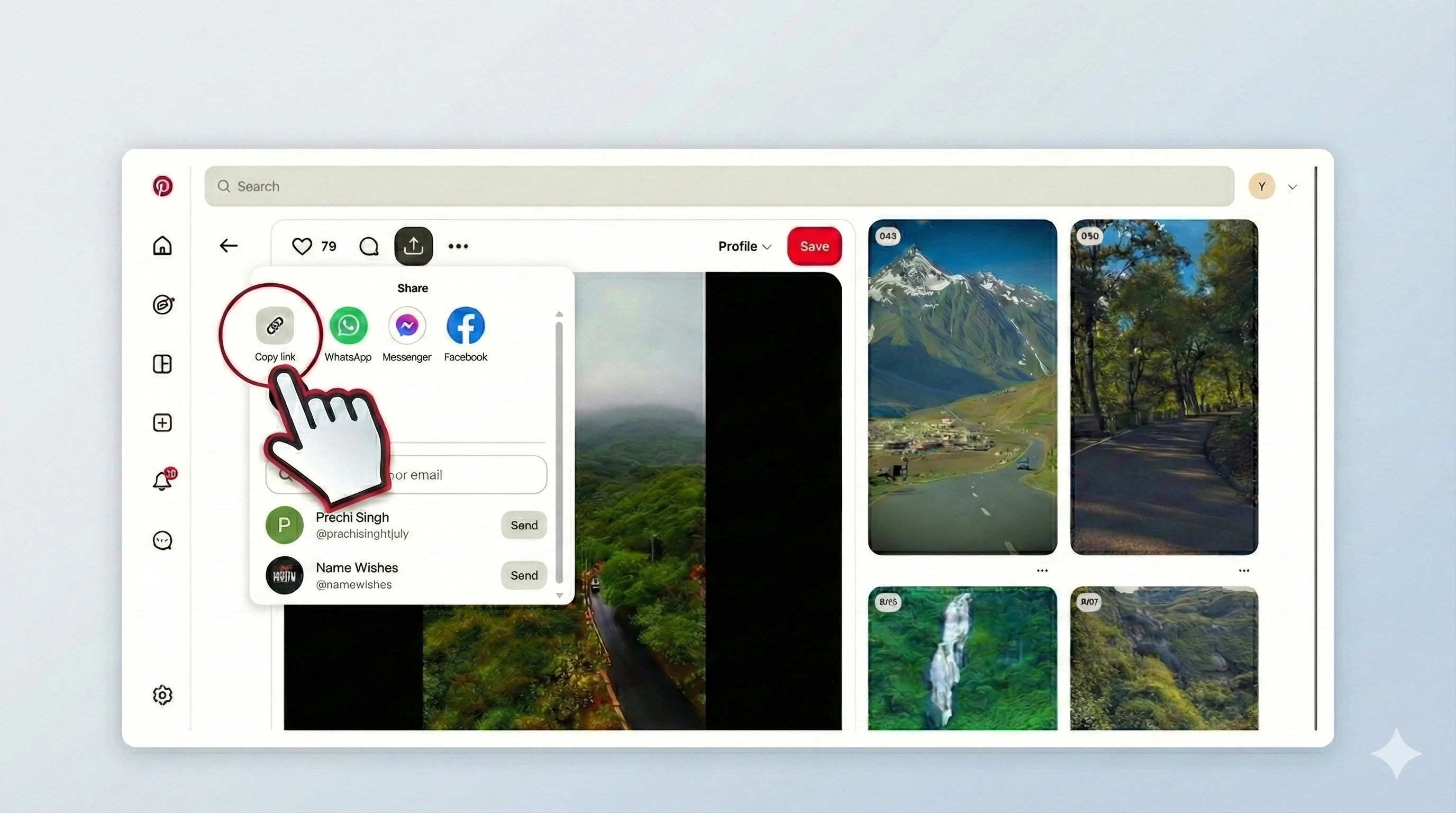
Open Pinterest and locate a video Pin. The URL should look like pinterest.com/pin/... or a pin.it short link. Private pins or image-only pins will not download, so make sure the pin actually plays a video.
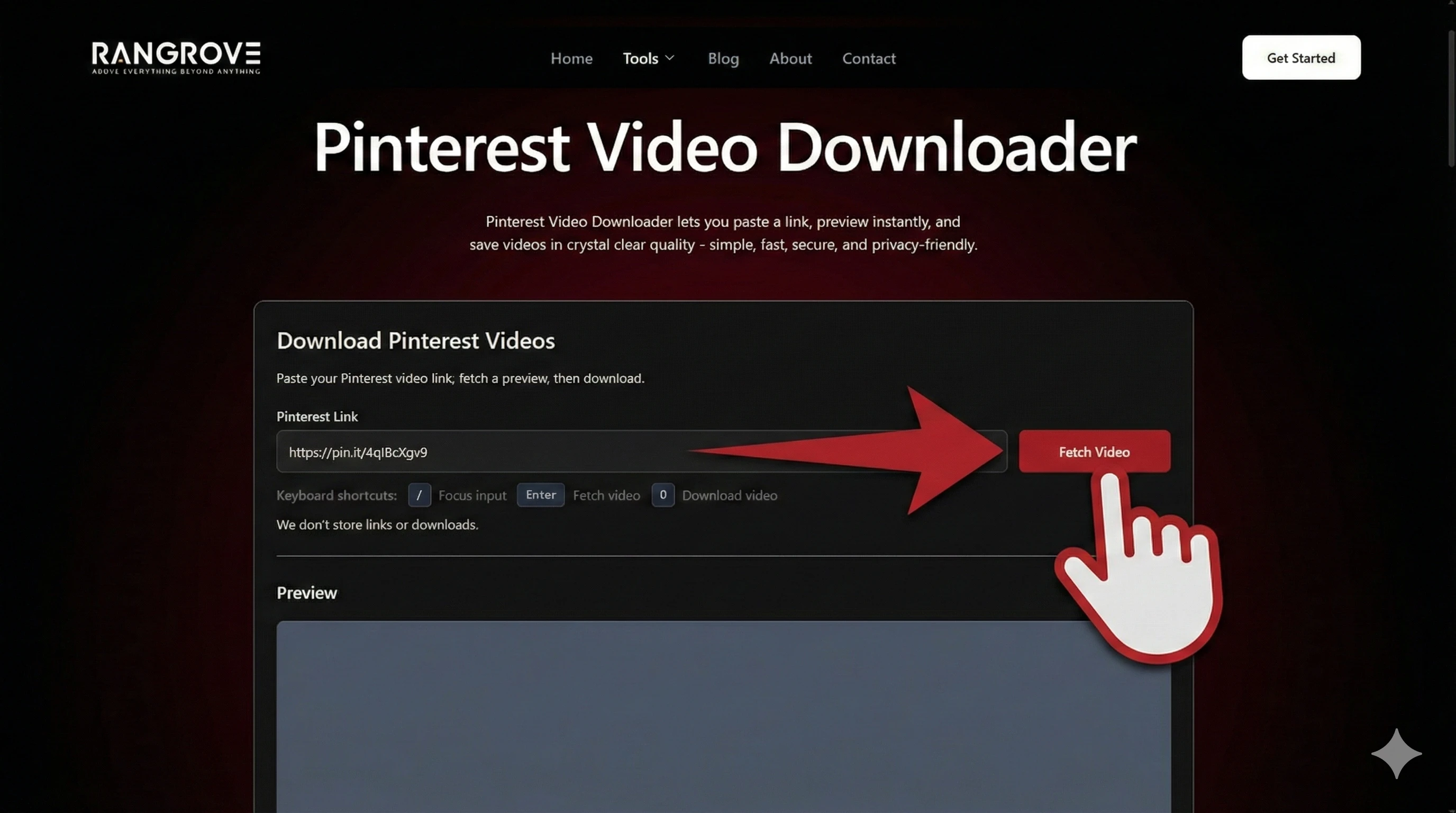
Paste the pin URL into the downloader and click Fetch. The tool resolves the link, checks that the pin contains a video, and prepares a direct MP4 source when available.
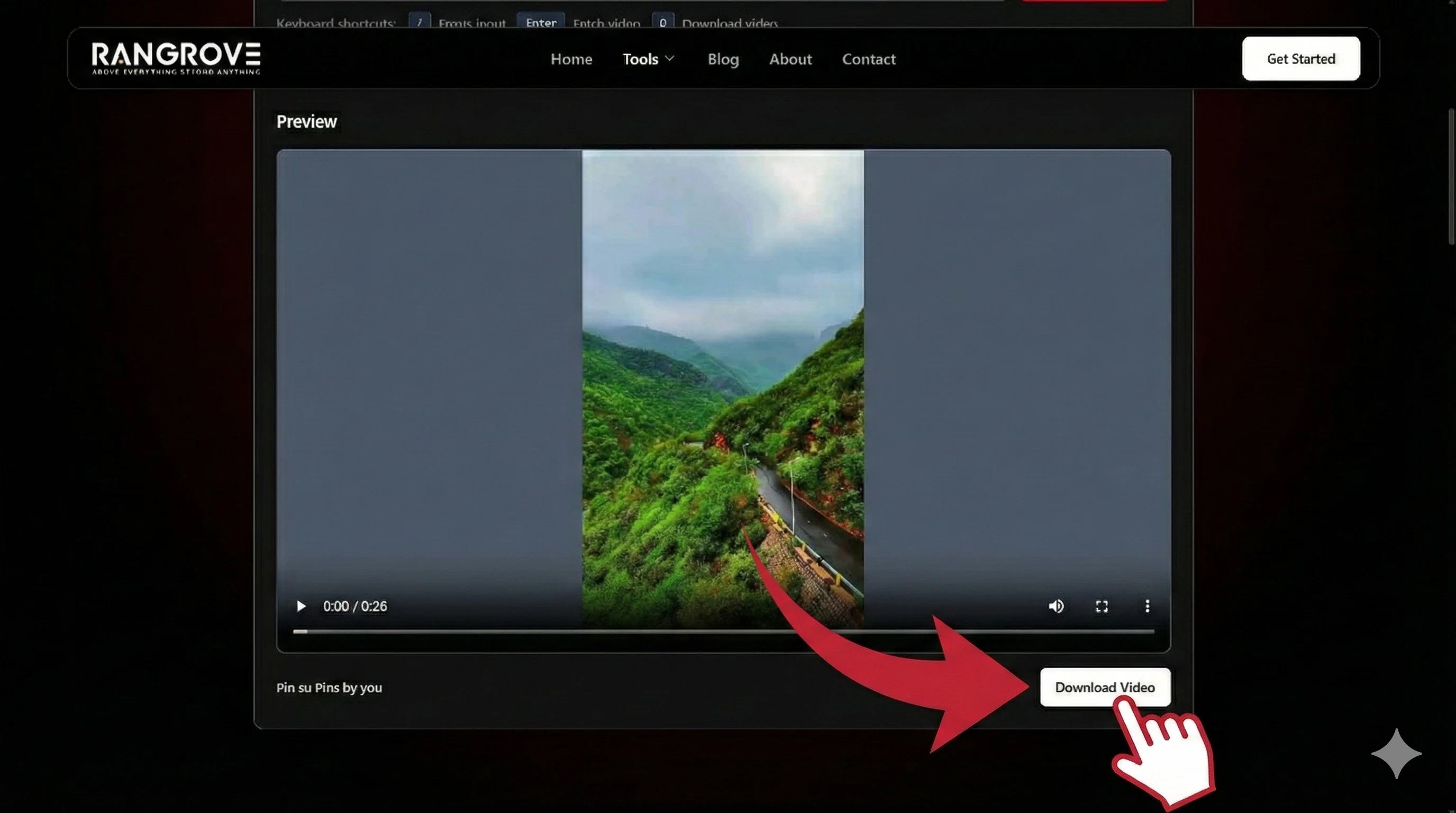
Preview the clip to confirm it is the right pin, then download the original MP4. If the preview fails, try another public video pin or a fresh link.
Best results come from public video pins with clear playback.
Pinterest videos are used across creative, education, and planning workflows. Here are common reasons people save video Pins.
Save video Pins as references for pacing, camera angles, and transitions when planning your own short-form content.
Download tutorial Pins to watch offline during study sessions or in classrooms with limited connectivity.
Capture motion references for campaign mood boards, product styling, or visual trend research.
Keep favorite recipe or workout videos handy without relying on a live connection every time.
If a pin is public and includes video, this tool helps you save it quickly for reference later.
Pinterest is built for visual ideas. Video Pins add motion and context, which makes them ideal for learning, planning, and collecting inspiration.
Pinterest is a visual discovery platform where people save ideas as Pins and organize them into boards. Many Pins contain short videos, tutorials, or demos that creators use to share step by step guidance.
Pinterest hosts image Pins, video Pins, and Idea Pins. This downloader focuses on public Pins that include a playable video. If a pin is image only or private, a download will not be available.
Designers, marketers, and founders use Pinterest to study trends and build references. Saving a public video Pin lets you revisit creative direction, lighting, or framing without hunting the pin again.
From recipes to DIY tutorials, Pinterest videos are packed with practical steps. Downloading a clip lets you watch offline, pause on key moments, and keep a personal learning library.
Save public Pinterest video Pins for offline reference, mood boards, and learning on your own schedule.
Reliable Pinterest downloads are about precision. We focus on public video pins, clean previews, and simple downloads.
This tool is tuned for Pinterest video Pins and short links, so you can move from a pin URL to a playable MP4 in a few steps without extra setup.
We do not ask for Pinterest logins. You can test a public pin, preview the clip, and download without creating an account or sharing credentials.
Our resolver is optimized for Pinterest redirects and pin page parsing, which helps surface the video source quickly when it is available.
Pinterest changes its delivery patterns over time. We monitor these shifts so the downloader keeps working for public video pins.
Built for Pinterest users who want quick saves, clear previews, and reliable downloads.
We support pinterest.com/pin/... links and pin.it short URLs. The pin must be public.
If the Idea Pin includes a public video segment, the tool may resolve it. Results vary by pin format.
Many pins are images only, or the pin is private or restricted. In those cases there is no video to download.
We download the MP4 source Pinterest exposes for that pin. Quality depends on the original upload.
Yes. Most mobile browsers can download the MP4 after the preview is ready.
No. Links are used only to fetch the video and are not stored.
We don't store links or downloads.
Paste a link to get started.